ThinLinc Architecture
The goal of this chapter is to give a technical overview of how the system works for someone who will install or maintain a ThinLinc installation.
ThinLinc is a product for managing server based computing. The system is largely based on open source software, which has led to an expansion of the product to encompass solutions for authentication, availability systems, emulation and conversion between different computer systems. ThinLinc can be used as a gateway between different types of clients and a large number of base systems.
The system architecture allows an existing infrastructure to be maintained while a new architecture is gradually introduced to the organization. The system can be launched alongside the existing systems for a gradual migration to a new platform, and at the same time it acts as a link or gateway between the existing systems.
The architecture is designed to be flexible in order to handle larger organizations with autonomous office applications or functions, whilst maintaining management and security. The system can be supplemented with an automated system for installation, configuration and administration of the client hardware, such as through the use of PXE. It’s also possible to create different user groups. In this way departments with special needs are easily administered in the case of adaptations or user-driven application development.
Fig. 1 gives an overview of the ThinLinc architecture.
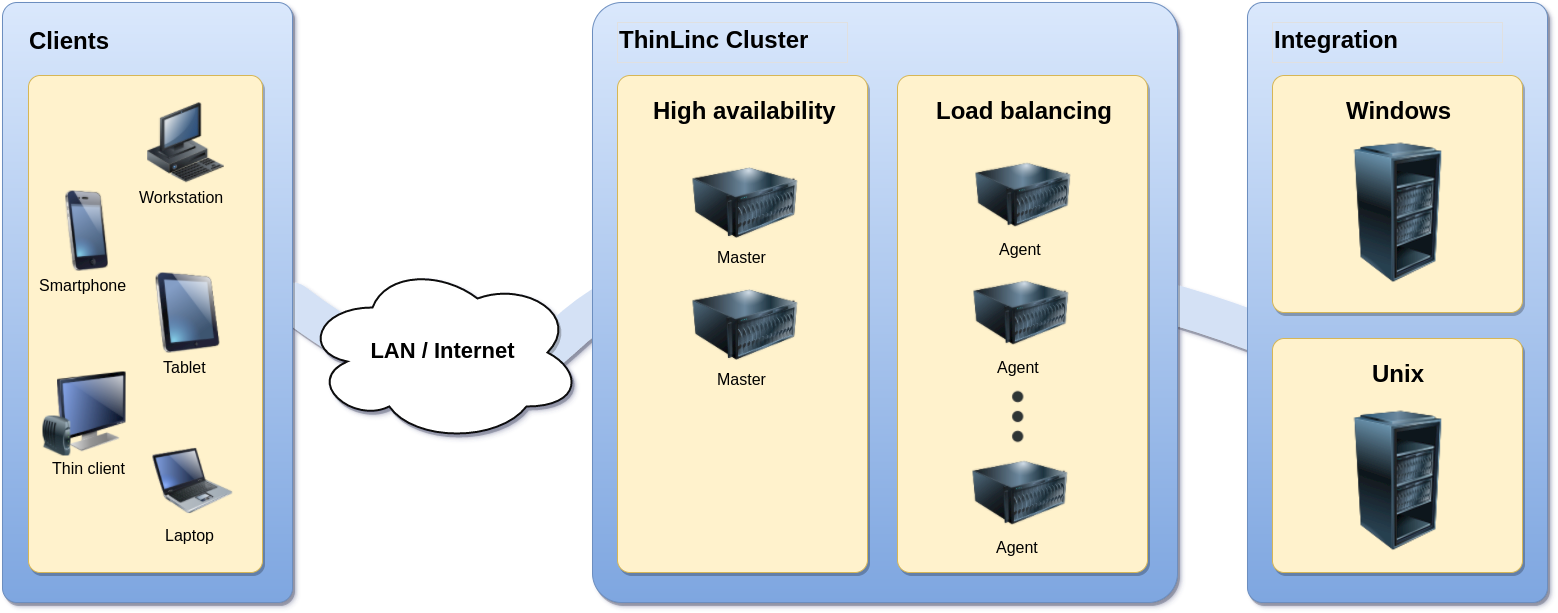
Fig. 1 The system architecture of ThinLinc
Several different devices can be used to connect to a ThinLinc system. ThinLinc client applications are available for Linux, macOS, Windows and selected thin terminals. ThinLinc Web Access is also available, enabling web browsers to act as ThinLinc clients.
The clients connect to a ThinLinc system located on the Local Area Network (LAN) or on a Wide Area Network (WAN) such as the Internet. Depending on the network type and the bandwidth available, several bandwidth-saving algorithms can be used to provide good performance even over narrow-banded links. Encryption is used to secure all information sent between the client and the server.
When a user connects to a ThinLinc server, a session is created. This session is the user’s starting point for running applications either on the ThinLinc server(s) or on other servers reachable from the ThinLinc server. ThinLinc has a Single Sign-On (SSO) mechanism that enables passwordless but secure logins to (for example) Windows Remote Desktop Servers and other Unix Servers running special applications.
The ThinLinc servers runs on Linux platform. There is support for High Availability and advanced two-level load balancing.
Session Overview
When a user logs in from a native ThinLinc client, the following will happen:
The client establishes a SSH tunnel to the server entered in the server field of the client interface. If this fails, then the login process will be interrupted and an error message will be displayed.
The client tries to authenticate with the VSM server, through the SSH tunnel. The VSM server (VNC Session Manager) is the main process of ThinLinc, responsible for allocating and keeping track of user sessions.
If the authentication succeeds, the server will check if there already exists a session for the user. If there is a session, then information about it will be returned. If there is no session a new one will be started on an agent server and information about it will be returned. If more than one agent server exists, load balancing will be used to select which server to start a session on.
The client now disconnects the SSH tunnel to the VSM server and checks the information it received to see which agent server it should connect against.
The client now establishes a new SSH tunnel to the VSM agent server it received information about from the VSM server. Port forwarding for VNC is always established, as well as other ports depending on which local devices have been enabled. All tunnels are multiplexed over the same SSH connection.
The client now starts the VNC viewer, which will connect to the remote VNC server via the SSH tunnel.