



We recently came across a discussion on r/linuxquestions that caught our eye.
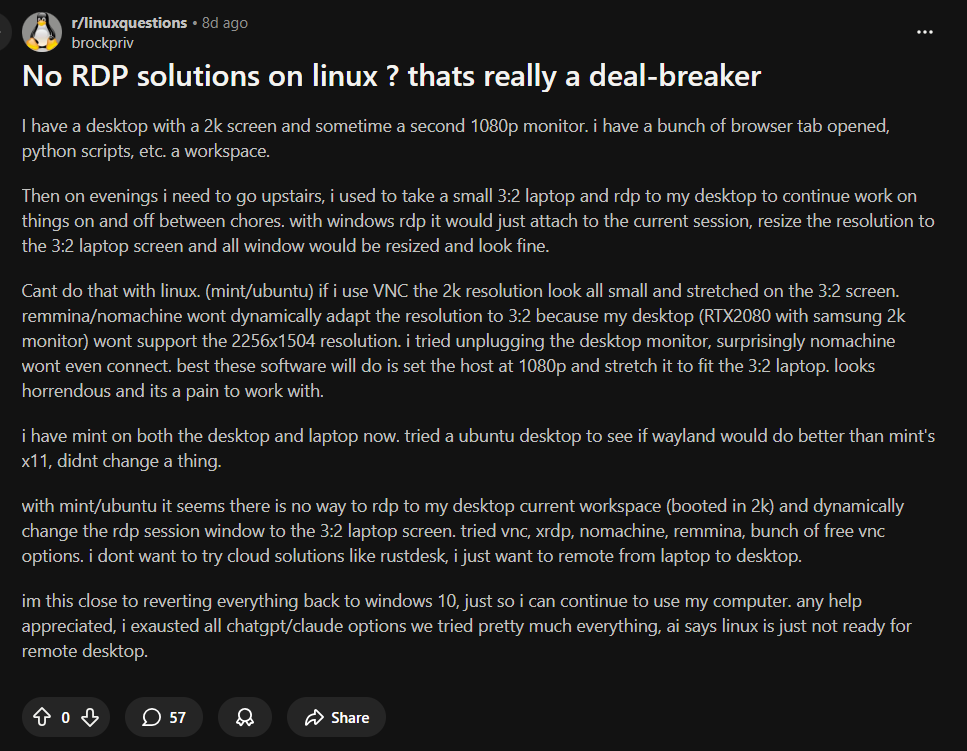
It stood out because they were right about the problem, but wrong about the cause. The user, brockpriv, described a scenario many of you face:
"I have a desktop with a 2k screen... on evenings I need to go upstairs, I take a small 3:2 laptop and rdp to my desktop... With Windows RDP it would just attach to the current session, resize the resolution... and look fine. Can't do that with Linux."
They tried VNC, Remmina, and XRDP. The result? Stretched screens, tiny fonts, or black screens because the physical monitor on the desktop couldn't handle the laptop’s resolution. The user concluded that "Linux is just not ready for remote desktop" and considered to wiping their drive and go back to Windows 10.
If you’ve ever found yourself editing config files at 2 AM just to get a remote screen to stop looking like a stretched JPG, this post is for you.
The reason brockpriv (and many others) struggle is that they are trying to "Shadow the Console."
They are logging into their physical monitor, starting their work, and then trying to force that physical screen to display correctly on a laptop with a completely different aspect ratio. On Linux, this is a nightmare. Your physical GPU is shaking hands with your physical monitor; when you force a remote laptop resolution onto it, X11 (and Wayland) often throws a fit.
The alternative is to change where your "Work" lives.
Windows RDP works seamlessly because it switches between a physical and a virtual environment that lives in memory, not on the video cable. ThinLinc works on Linux by providing a similar user experience, but handling things in a different way. But to make this work, you have to stop logging into your physical monitor directly.
To get that perfect, resizable, persistent workflow, you need to work inside a ThinLinc Virtual Session all the time—even when you are sitting in front of your powerful desktop.
Here is the workflow that solves the Reddit user's problem:
No stretching. No surprises. No xrandr hacks.
In the Reddit thread, someone actually suggested ThinLinc. The user immediately shot it down:
"Haven't tried, not really interested in cloud services to connect two local computers."
We need to clear this up right now: ThinLinc is NOT a cloud service.
It is software you install on your hardware. It runs on your network. Your data never leaves your building. We don't see your screen, your files, or your keystrokes. It is as "local" as SSH or VNC, just built on a smarter architecture (based on open-source TigerVNC) that understands modern workflow needs.
The Reddit user wanted three things:
This isn't a "Windows thing." This is a "Right Tool for the Job" thing. If you are trying to replicate this workflow using basic VNC scraping tools on your physical console, you are going to have a hard time.
If you are close to giving up on Linux because remote desktop feels "janky," try installing ThinLinc. It’s free for up to 10 concurrent users. Just remember: Work in the virtual session, not the console, and your desktop will finally follow you wherever you go.
